To activate your land and start earning rewards, you will need to understand Lunium—the essential resource that powers your plots—and how your specific Land Tier impacts your earnings.
This guide breaks down everything you need to know about Lunium, including how to acquire it, the differences between Global and Local Lunium, and how to adjust your land plot settings to choose which Lunium you want to use.
What is Lunium?
Lunium acts as the fuel for your land. In Terrariums, the core gameplay loop works on an hourly system called a Tick. Every hour, your land automatically consumes Lunium and it automatically earns bAXS rewards based on your plot's total Atia's Flame.
💡 Lunium is an off-chain resource and is not tradable on the blockchain or market. It exists solely within the Terrariums ecosystem to power your land's active earning state.
What happens if I run out of Lunium?
If your land runs out of Lunium, it will stop earning bAXS. However, your axies will automatically switch to earning AXP per tick instead.
NOTE: The land plot will only resume with earning bAXS once the local Lunium reserve is full. You cannot manually trigger the land plot to start earning again while the Lunium reserve is only partially full.
💡 Axies can only earn AXP while they are not actively contributing Atia's Flame to a plot with active Lunium.
How to Buy/Get Lunium
To keep earning bAXS rewards, you need to manage your Lunium supply. You can either rely on your land's automatic passive regeneration or top up your account instantly via the in-game shop.
Local Lunium
Every Land NFT automatically generates Lunium over time, tied directly to that specific plot.
- It takes 5 days (120 hours) of passive regeneration to accumulate enough Local Lunium to fuel 1 full day (24 hours) of maximum bAXS earning.
- You cannot manually resume bAXS earning when the Local Lunium reserve is only partially regenerated. It will restart automatically once the reserve has fully regenerated.
- Each plot recovers a specific amount of Lunium per hour (per tick) depending entirely on its Land Tier.
⚠️ Your land plot cannot generate Local Lunium while it is actively consuming its own Local Lunium. Regeneration only starts once the Local reserve runs out.
If your plot is set to Global, your Local pool keeps recovering while you run on Global Lunium. That recovery is credited toward your Global Lunium cost, so your local regen covers part of what each tick spends. You only pay the difference out of your Global pool.
Additionally, local lunium progress stays per account.
- If transferred, it resets with its new account's progress from 0
- If transferred back to old account, it retains old progress
Global Lunium
If you want to keep your land running at full pace, consuming Lunium each tick to earn bAXS without waiting for the 5-day cooldown, you can buy Global Lunium packages that can be shared across all lands on your account. To purchase Global Lunium:
- Click on your Global Lunium Balance or open the Shop.
- Browse the available options and choose the Lunium package or daily subscription tier that best fits your needs.
The "Essentials" Tab: Here, you can buy one-time Lunium packages such as the Lunium Stash (25,000 Lunium for $0.99) or the Lunium Cache (131,250 Lunium for $4.99).
The "Blessings" Tab: For $9.99, you’ll get 11,000 Lunium/day for 30 days for a total of 330,000 Lunium. Any missed days will safely stack up for you.
- Complete the purchase using bAXS, AXS, USDC, or WETH. (There is no exchange rate applied when purchasing Lunium with bAXS)
"Global vs Local" settings
You can customize how your land plots consume Lunium by adjusting your settings directly within the Town Registry menu, which is accessed by clicking the Registry button in-game. This gives you the flexibility to manage your Lunium source on all your plots or an individual plot level.
All Plots Settings
Using the ‘Use Global Lunium’ toggle at the top of the Town Registry menu you can set a single Lunium source for your entire account:
- Toggle ON: Forces every activated plot on your account to draw fuel from your centralized, purchased Global Lunium pool.
- Toggle OFF: Reverts your plots to utilizing their own free, plot-specific Local Lunium source by default.
Per-Plot Settings
To set a Lunium source for a specific plot, you can configure it individually from the Town Registry menu:
- Select the specific land plot you want to configure.
- Find the Lunium Source menu on the right-hand details panel.
- Choose your preferred option:
- Global: Uses the global Lunium reserve, offset by your plot's Local recovery each tick. Automatically falls back to Local source when empty.
- Local: Consumes only local Lunium tied directly to that plot. Once empty, the Atia Shrine stops active bAXS earning and will not touch your purchased Global reserve.
- Click Save changes.
💡 All setting changes take effect at the boundary of the next Tick (the hourly update).
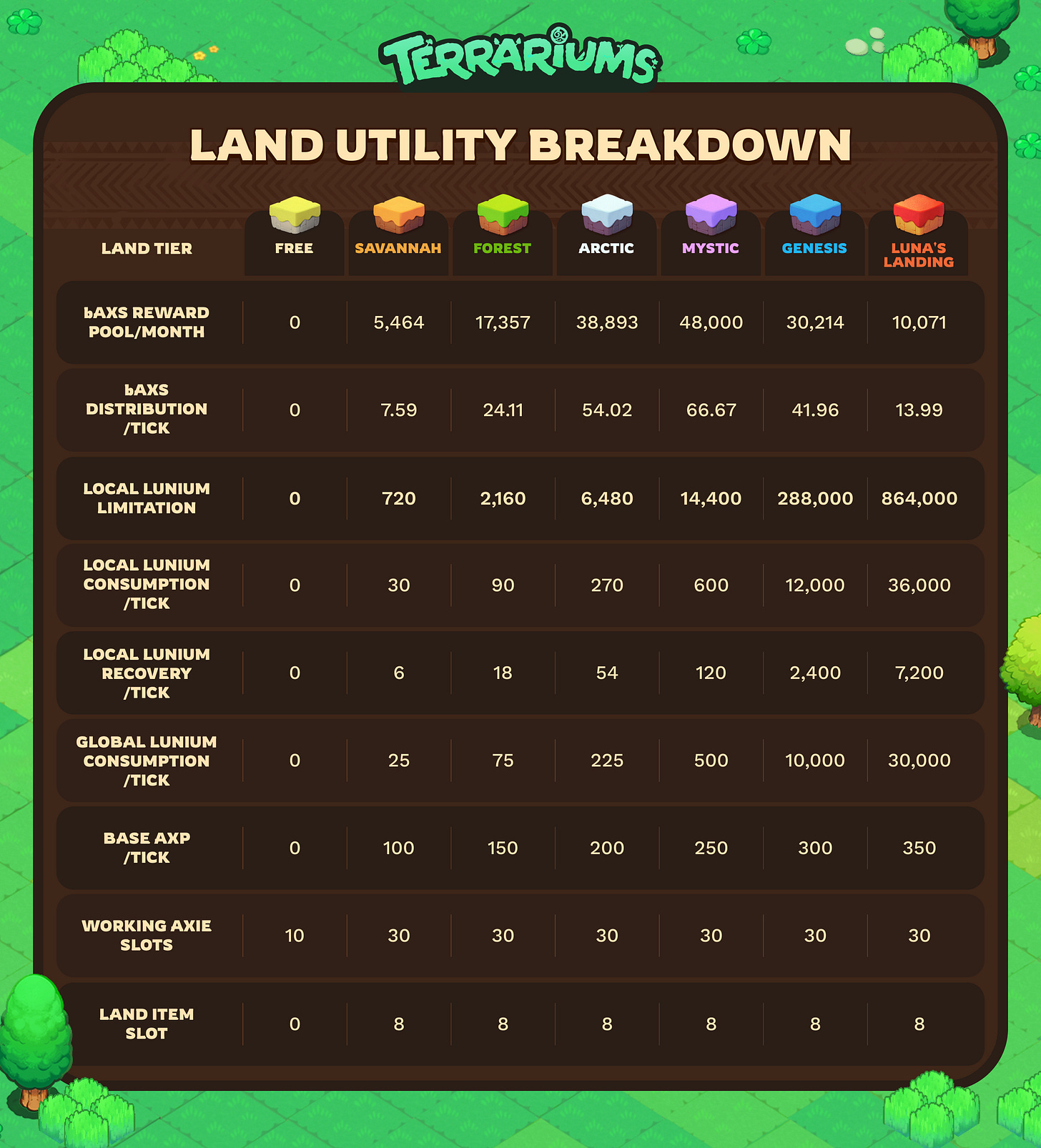
Land Tiers: Lunium Limits, Consumption, and Recovery Rates
Your Local Lunium Limit, Consumption/Tick, Recovery/Tick depend entirely on your Land Tier. Refer to the table below to find the exact metrics for your plot.
Why Global Lunium costs less per tick
You may notice that Global Lunium consumption is lower than Local for every tier. Mystic consumes 600 Local per tick but only 500 Global. This is not a discount. It is your Local recovery being credited back to you.
When your plot runs on Global, your Local reserve keeps recovering in the background. Once that reserve builds up to a full tick's worth, the plot spends the Local Lunium instead of your Global supply for that tick. Over time this averages out into a lower Global rate.
Using Mystic as an example, with 600 consumption and 120 recovery per tick:
Tick | Local reserve at start | Lunium used |
|---|---|---|
1 | 0 | Global (600) |
2 | 120 | Global (600) |
3 | 240 | Global (600) |
4 | 360 | Global (600) |
5 | 480 | Global (600) |
6 | 600 | Local (600), reserve resets to 0 |
Total (Global) | 3,000 | |
Table 1. Theoretical values if the local lunium recovery values reflect each tick.
Across that 6 tick cycle you spend 3,000 Global to run 6 ticks. Averaged out, that is 500 Global per tick, which is the number used.
Tick | Lunium used |
|---|---|
1 | Global (500) |
2 | Global (500) |
3 | Global (500) |
4 | Global (500) |
5 | Global (500) |
6 | Global (500) |
Total (Global) | 3,000 |
Table 2. Values used for system simplification.
Every land tier recovers exactly one fifth of what it consumes each tick, so every tier follows the same 6 tick cycle and the same 5/6 rate.