Welcome to the vibrant world of Terrariums! Building a thriving digital ecosystem is a rewarding experience where you can nurture your land, care for your axies, and watch your environment flourish. Through this experience, your axies will earn you a share of bAXS.
Let’s explore exactly how these mechanics work and how you can prepare your land.
Getting Started
Before you can begin, you need to prepare your land and assign your axies.
⚠️ IMPORTANT NOTE: Activating a land plot and assigning axies will lock the NFTs. This means neither the plot nor the assigned axies can be listed, transferred, nor sold on the App.Axie marketplace while they are active in Terrariums.
Activating Your Land Plot and Assigning Axies
Before you can begin, you need to prepare your land and assign your axies. If you haven't done this, you may check our Getting Started with Terrariums article for instructions on how to do so.
NOTE: Only NFT land plots allow you to earn bAXS.
Lunium
Before your ecosystem can truly thrive, you need the primary resource: Lunium. Every major action in the game utilizes it.
Free Generation: Your NFT land plot naturally generates a set amount of free Lunium. Your Axies will consume this resource to generate bAXS until the supply runs out. Once depleted, the plot enters a "recovery" phase for approximately 5 days before it generates enough Lunium to start up again.
Global Lunium from Shop: If you prefer not to wait out the recovery period, you can purchase Lunium directly from the Shop. This allows your plot to continuously run without resting, as long as you keep your resource supply topped up.
Check our Lunium guide for more details regarding Lunium generation rate and how to purchase.
Atia Shrine
Once your axies are settled into your land plot, the Atia Shrine serves as your central hub for managing their daily activities and tracking your ecosystem's overall performance. The shrine is divided into two straightforward tabs:
-
Prayers: This is where you manage your axies' activities. If you need to switch things up, you can assign training axies to pray [to contribute to your Atia's Flame score], or you can recall praying axies to stop them from praying and have them start training [to gain AXP] instead.
-
Information: This is your analytics hub. Here, you can keep a close eye on your plot's performance to see the estimated earning you'll get in the upcoming tick [hourly distribution]. You can also view your earnings in the previous tick, as well as your overall earnings from that plot.
Praying vs. Training
In Terrariums, your Axies can either focus on generating rewards or gaining experience, but they cannot do both at the same time. You will need to choose a specific role for each assigned Axie:
- Praying [Atia Shrine]: The Axie contributes to your Atia's Flame score, increasing your share of the hourly bAXS distributions.
- Training [Dojo]: The Axie focuses entirely on personal growth, earning AXP instead of generating bAXS.
You can manage which axies pray or train by assigning them to pray or recalling them to train on the Atia Shrine page.
Earning System
The mechanics of the Terrariums economy operate on an hourly distribution system called ticks.
💡 To understand the Tick Logic better, you check this article: https://support.axieinfinity.com/hc/en-us/articles/51905135924379
Exactly once every hour, the active Axies you assign to pray will increase your Atia's Flame score. At the end of the hour, the system calculates your share of the rewards based on how much Atia's Flame you generated compared to everyone else playing in your specific plot environment.
Here is the exact formula used to determine your hourly payout as well as a sample earning calculation:
Because it operates on a shared pool system, your bAXS generation will naturally fluctuate depending on how many other players are actively utilizing Lunium in your environment at any given hour.
Land Plot Reward Pools
The total amount of bAXS available is divided into monthly reward pools, which are designated by the specific environment of the plot (Savannah, Forest, Arctic, Mystic, Genesis, or Luna's Landing).
Atia's Flame
Your plot provides the venue and the resources, but your axies do the heavy lifting. Atia's Flame is the score your praying axies generate, and it decides your share of the hourly bAXS pool. The higher your flame compared to other players in your environment, the larger your cut.
Your base flame comes from the collectible type of each axie you assign to pray. You can raise it further with evolved parts, equipped accessories, land items, and Fortune powder.
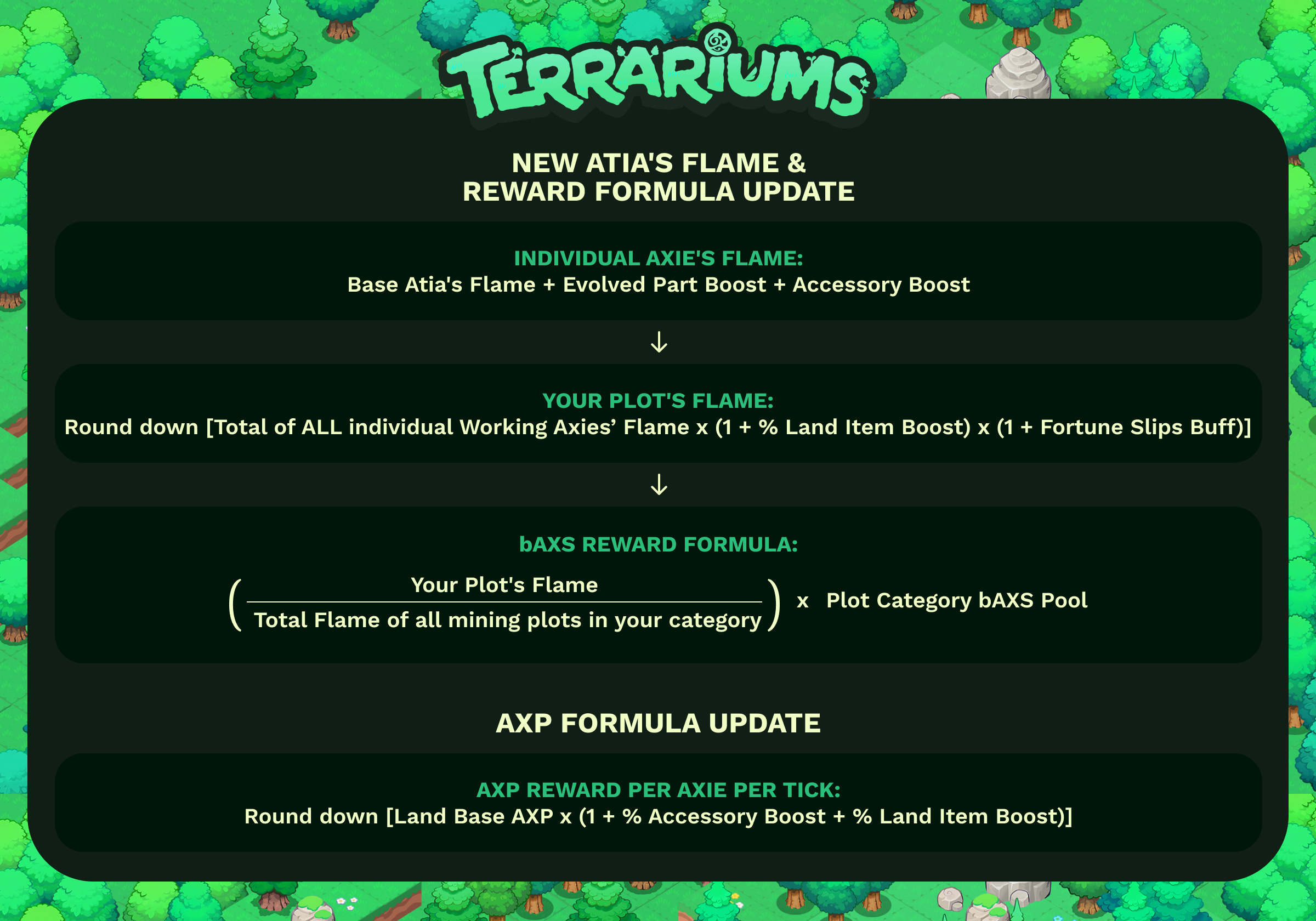
For the full base value table, every bonus source, and the complete reward formula, see What is Atia's Flame?
Leaderboard
Curious about how your land plots stack up against the competition? You can check the Leaderboard to see how other players are performing across the hourly, daily, and monthly distributions.
Claiming Rewards
Once your Axies have generated bAXS, claiming your rewards is a simple process:
-
Click on the Claimable bAXS section at the top of your screen [this displays your current claimable amount].
-
Click Claim Reward in the popup window.
-
Your claim will enter a review period. After approximately 3 days, you can officially claim your bAXS on the App.Axie Claim Tokens page.